
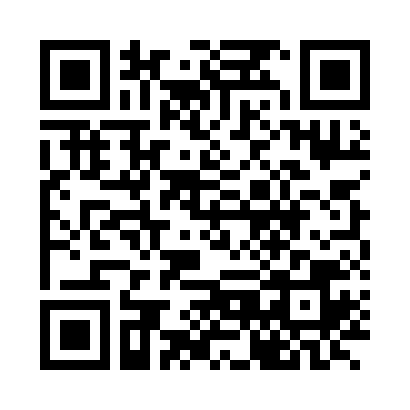
Wallet address
qqz4ru4ewkn8edttrlm4faex7f0r0tvfhvfn4jlmg2
Tap the code or the address to pay
No wallet app? Copy the address and paste it into a wallet you already use, or send the money later. This address does not expire.
Pay with Bitcoin Cash
Scan or tap the code above. If you have a Bitcoin Cash wallet, that is the whole job — the address is filled in for you and you only enter the amount.
If you have never used Bitcoin Cash, or you are not sure what any of this means, the common questions below cover it. Nothing on this page is required reading first.
Common questions
I am on a phone. How do I scan a code that is already on my screen?
You do not scan it — you tap it. The code and the address are both live links, and a tap opens your wallet with our address already filled in.
Scanning a QR code is only for when the code is on a different screen from your phone: if you are reading this on a laptop or desktop, open your phone’s camera over the code and it will scan. On the phone itself, tap.
Either way you end up in the same place, with the same address, ready to enter an amount.
I tapped it and nothing happened
That means no app on your phone is set up to handle Bitcoin Cash links. This is normal if you have never used Bitcoin Cash — the link is an instruction to an app that is not installed yet, and tapping it produces no error, it just does nothing.
Two ways forward:
- Copy address above, then paste it into any wallet you already have.
- Install a wallet (the next question) and tap again.
I do not have a wallet. What is one?
A wallet is a free app that holds your Bitcoin Cash. Creating one costs nothing and does not involve buying anything — you are only setting up the ability to send and receive.
We recommend Selene Wallet — a free, open-source Bitcoin Cash wallet for iOS, Android and the browser, built for Bitcoin Cash alone rather than bolted onto a multi-coin app. Get it from the App Store or Google Play.
Not ready to install an app? You can try Selene in a browser and pay from there instead.
Paytaca is another Bitcoin Cash-only wallet for iOS and Android, if you would rather use that one.
Whichever you pick, install it and open it once. The tap links on this page work straight away afterwards. You do not need to understand how the network works for it to function.
I do not have any Bitcoin Cash
Then a wallet alone will not do it — the app is how you hold Bitcoin Cash, not a supply of it. You need some of the currency before you can send any, and this page cannot provide it.
You can get some. Bitcoin Cash can be bought outright, or you can be paid in it by someone who already holds some. Either way, once it is in your wallet the code at the top of this page works exactly as it does for anyone else.
Or you do not have to use Bitcoin Cash at all. That is a perfectly reasonable choice — it is a payment method, not a requirement, and we would rather you paid in whatever is convenient than not paid. Call us at (509) 903-5116 and we will sort it out.
If you were expecting to be able to pay by card, we should be straight with you: this page is Bitcoin Cash only. There is no card form here, and we would rather tell you that now than let you look for one.
Can I send Bitcoin (BTC) instead?
No. Bitcoin Cash and Bitcoin are two separate networks. They are not versions of each other, and there is no automatic conversion between them.
If you send Bitcoin to a Bitcoin Cash address, the Bitcoin stays on the Bitcoin network. We never receive it, nothing is credited to your account, and no notification will come from us — because from our side, no payment happened. Sending Bitcoin here is the same as sending nothing.
This catches people because Bitcoin Cash began as a fork of Bitcoin, so for years the two used near-identical addresses. Bitcoin Cash now uses a different format that cannot be confused with a Bitcoin one: it always begins with q or p, never with a 1 or 3.
bitcoincash:qqz4ru4ewkn8edttrlm4faex7f0r0tvfhvfn4jlmg2So before you confirm, check that:
- Your wallet is set to Bitcoin Cash (BCH), not Bitcoin (BTC)
- The address begins with q or p, as shown above
- The amount is in BCH — Bitcoin is worth far more per coin, so a slip from a BTC balance can send a very large amount by mistake
- The address in your confirmation matches the one on this page, character for character
If you have already sent Bitcoin by mistake, contact us. We cannot recover it — the coins are on a different chain — but telling us is still worth doing, and an exchange or wallet provider may be able to help. Please do not send a second payment trying to make up for the first; that is how one mistake becomes two.
What does it cost, and how long does it take?
A fraction of a cent either way, and usually confirmed in a matter of seconds. There is no reason to wait for a cheaper rate — the network does not get cheaper at quiet times, and sending earlier does not save anything.
If you have sent the payment and it has not shown up, check your wallet’s own pending list first; payments sometimes sit there before appearing in the balance.
Something went wrong
Call us at (509) 903-5116 and we will check from our side before you try anything else. If the address in your wallet does not match the one on this page, do not send the payment — call instead.
Is it safe to send to an address on a public page?
Yes. The address is a receiving address, not a secret: anyone can send to it, and nobody can take anything from it by knowing it.
What must stay private is your recovery phrase or seed phrase. Nobody from Specially Brilliant will ever ask you for it, and no legitimate reason exists for anyone to. A message claiming to be from us and asking for those words is a scam — ignore it and tell us.